
Release Notes
Enhanced Move Permissions
Users can move items between lists within the same library, if they have “edit” permissions for that library. This change allows for better organization of personal or shared lists without requiring higher-level administrative rights.
CSV Import Template Renaming
Users now have the ability to rename existing CSV import templates. This improvement streamlines the workflow for managing import configurations, removing the need to delete and recreate templates just to change their name.
Improved Custom Fields Management
The “Manage Custom Fields” area has been moved to the Settings modal under the Custom Fields tab. This relocation centralizes configuration options, making it easier for administrators to find and manage metadata fields.
Thesis URL Visibility
The web application now correctly displays the URL field for items classified as “Thesis.” If a URL is populated via the API, it will be visible in the item details, ensuring comprehensive data access.
Shared Library User Management: Resolved an issue where administrators were unable to remove users from a shared library via the user interface. The “remove” action now functions as expected.
Dark Mode Visibility: Improved the visual contrast of custom field notifications when using Dark Mode in Firefox, ensuring that text is readable.
Feed Pagination: Fixed a bug where the pagination count in the Feed modal did not update immediately after a user deleted an item, potentially showing empty pages.
Modal Layouts: Addressed a layout issue that caused the Trial modal to display incorrectly if the user navigated to other settings screens simultaneously.
Improved handling of mislabeled Open Access articles
Some articles are incorrectly flagged as Open Access. Previously, trying to access these could lead to a dead end with no option to download or purchase.
With this release:
-
Users now see a clear notice if an article labeled as Open Access cannot be downloaded.
-
A purchase option is available when appropriate.
-
Users can request manual fulfillment for download or purchase if needed.
This helps reduce confusion and ensures users can still access articles even when Open Access data is incorrect.
Expanded Reference Type Schema
Added support for a broader range of reference types in the schema: thesis and book, enabling more accurate categorization and improved compatibility with varied publication formats. This update ensures better metadata consistency across imported and manually added references.
Wiley PDF Downloads
Improved handling of Wiley-hosted articles to ensure reliable PDF downloads directly within the platform. Users benefit from a smoother retrieval process, reducing the need for manual access through publisher sites.
PDF Naming for Imported Files
Updated the logic for naming imported PDFs, replacing system-generated hash names with clearer, publication-based titles. This makes file management and identification of references easier, especially in larger libraries.
Chrome to App PDF Sharing on iOS
Fixed an issue where sharing a PDF link from Chrome to the iOS app did not open correctly. The fix ensures smoother cross-app transitions and access to shared files.
Filtering by multiple labels in PRISMA reports
PRISMA reports now support filtering by multiple labels at once. This allows for more granular control and better organization of your review data, especially when tracking complex inclusion criteria or multi-category projects.
Enhanced navigation for unreviewed articles in PRISMA
Users can now scroll through all unreviewed articles within the PRISMA view. This improvement makes it easier to browse and assess pending items.
AI Access Control
Added organization-level settings that restrict AI interactions (Chat with PDF and Chat with Library) to content from sources approved by an organisation, ensuring responsible use and better data governance across all AI features.
Search for Users in Shared Libraries
Users can now easily find collaborators within shared libraries using the new user search option, making it simpler to manage access and collaboration.
Trial Feed Management
Improved handling of feed activation and reactivation for trials and downgrades to ensure smoother transitions and accurate system updates.
Main Menu Resizing: Resolved a layout issue that affected the main menu panel when resizing the window.
Form Template Limits:
Users can now create form templates with up to four stages. This limit helps prevent configuration issues and ensures smoother workflows when setting up Literature Review forms.
Reviewer Display in Literature Review:
We have fixed an issue where edits made by a different reviewer were not reflected in the reference table or reports. The correct editor’s name is now captured, improving review traceability and accuracy.
Bulk Add Notes: You can now add notes to multiple items at once, making it easier to annotate or categorize several entries in a single action.
Bulk Add Color Labels: Apply color labels to multiple items simultaneously to visually organize your library faster.
AI Email Summaries: AI-powered email summaries are now sent only to users who have access to this feature, ensuring relevance and reducing inbox clutter.
Updated ‘Product Label’ Metadata: Interface labels have been refined to use more accurate wording for clarity and consistency.
Modal Behavior Update: Improved modal behavior when clicking outside or pressing ESC, reducing potential errors and improving user experience.
Bug FixesMatch List Scrolling: We have fixed an issue where the scroll bar in the Match list was not functioning correctly.
Avatar Display in Chat with Papers: We have corrected a minor visual glitch with avatars showing three initials.
Dropdown Checkbox Alignment: We have fixed inconsistent alignment of checkboxes within dropdown menus.
Fixed an issue where citation styles containing a “+” character in their name could cause SmartCite to stop responding or enter an endless loading loop when selecting a bibliography.
Resolved a UI issue where the previously used search term in SmartCite remained visible in the search bar even after leaving the filtered view or performing actions like adding or updating citations. The search field now properly clears when the context changes.
Adding tags in bulk.
Users can now add tags for multiple items at once. This new bulk “add tags” functionality makes it much faster to organize large libraries and maintain consistent tagging across many references.
Download new desktop app from Tools page.
We have added a dedicated “Downloads” section where users can download the latest desktop app directly from within the app.
List item removal behavior.
We have improved how the system handles removing items from lists to ensure the UI updates immediately and consistently.
Bug Fixes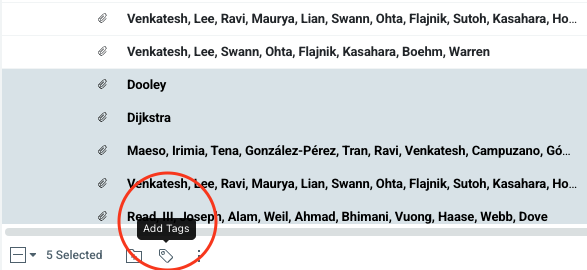
Patent number import. Fixed an issue where patent identifiers longer than 10 digits were not imported correctly.
Share as public list not available in some cases. Restored access to the “Share as public list” option for all users with appropriate permissions.
Select all behavior. Fixed an issue where “Select all” stayed active after navigating away, ensuring selection always reflects visible items.
Bulk Actions Menu in Library and Search
A new bulk actions menu has been introduced to improve user experience by making available actions more explicit and visually accessible. This menu adds a floating component in both Library and Search modules to easily select and manage multiple papers, including actions like adding to library, tagging, and using AI assistant features. This consistency enhances how users interact with and manage their papers efficiently.
Library Menu Optimization
The Library menu has been tidied by grouping related options, making it easier for users to find and access essential features. List creation has been moved to a dedicated icon next to the gear icon, streamlining workflow for creating various lists. This reduces clutter and supports a more intuitive navigation experience.
Toolbar Enhancements for Select/Deselect All
The Select/Deselect All toolbar options have been improved so that users no longer need to click these buttons multiple times unnecessarily. The system now disables options when already selected or deselected, preventing redundant actions and saving time.
UI Header and Footer Updates in Library and Search
The Library and Search modules now feature updated headers and footers aligned with new design guidelines, providing a cleaner, more modern interface. Notable changes include moving the current library name to the footer, introducing a select all button in footers, adjusting the search bar placement, and adding visual improvements that help users better understand their context and selections.
Toast Notification Component
A new toast notification system has been implemented to confirm successful user actions clearly and reassuringly. This provides concise feedback for actions such as adding papers, creating lists, merging duplicates, and more. Toasts appear unobtrusively in the bottom-right corner and auto-dismiss, ensuring users stay informed without interrupting workflow.
Simpler PDF download process
We streamlined how PDFs are downloaded in the browser extension. Downloads now support more scenarios smoothly, reducing interruptions and giving users a more reliable experience.
Cleaner options when adding PDFs
We removed the outdated “Go to publisher with proxy” button to avoid confusion and keep the workflow focused on the most useful actions.
Choose your library when saving PDFs with injected PDF button
When adding a PDF through the “Save PDF to Papers by ReadCube” button, you can now select which library it should be saved to. This helps you stay organized when working across multiple projects.
PubMed results now recognized
We fixed an issue where the extension sometimes didn’t detect search results in PubMed. You can now seamlessly add articles from PubMed into your library again.
Reliable Elsevier downloads
Large PDFs from Elsevier could previously fail to download. This has been resolved, so all file sizes are supported.
Improved Kluwer support
We fixed several issues with downloads from Kluwer to ensure more consistent performance.
Tooltips restored
The tooltip for the “Open library” icon was missing in some versions. It is now back to help you quickly understand the button’s function.
Better handling of invalid searches. Instead of an infinite loading screen, users will now see a clear message when no results are found.
Clearer error notifications. Error messages are easier to notice and understand with an updated UI.
Custom style deletion feedback. A loader indicator now appears when deleting a custom style, making the process clearer and avoiding screen flicker.