
Release Notes
- The browser extension now saves PDFs from IOPscience. Previously, only the article metadata was imported for IOPscience articles, including open access ones, and the PDF had to be added separately.
-
PDF downloads from the Save PDF button are now more reliable on publisher sites that use additional access checks, such as Wiley.
-
The extension button now appears on Scopus article pages following the recent Scopus page redesign. It is shown next to the DOI with the article’s access status, and both Get PDF and Add to Library work as expected, including when an article is opened from the search results list.
Research Assistant floating panel
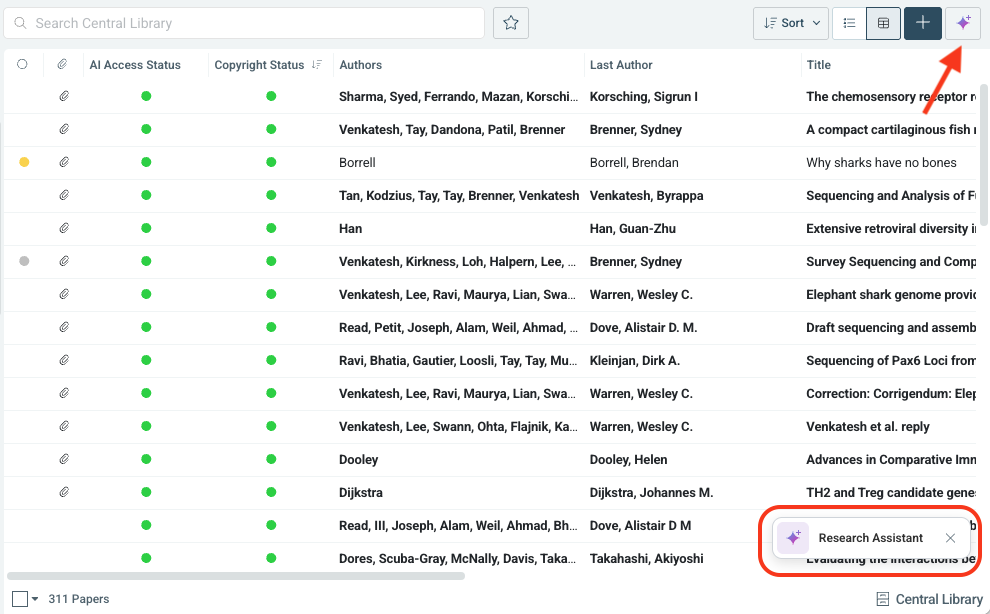
Research Assistant is now available directly in library views through a floating panel. Users can start with one of the suggested example prompts or write their own, and expand the conversation into full-screen Research Assistant at any time. The panel can be resized and minimised, all conversations are saved to Research Assistant history, and the assistant remains available from the sparkle icon in the toolbar.
Cookie consent banner
A cookie consent banner is now shown when users first open the web app. Users can review and change their cookie preferences at any time in My Profile > Settings.
Bug Fixes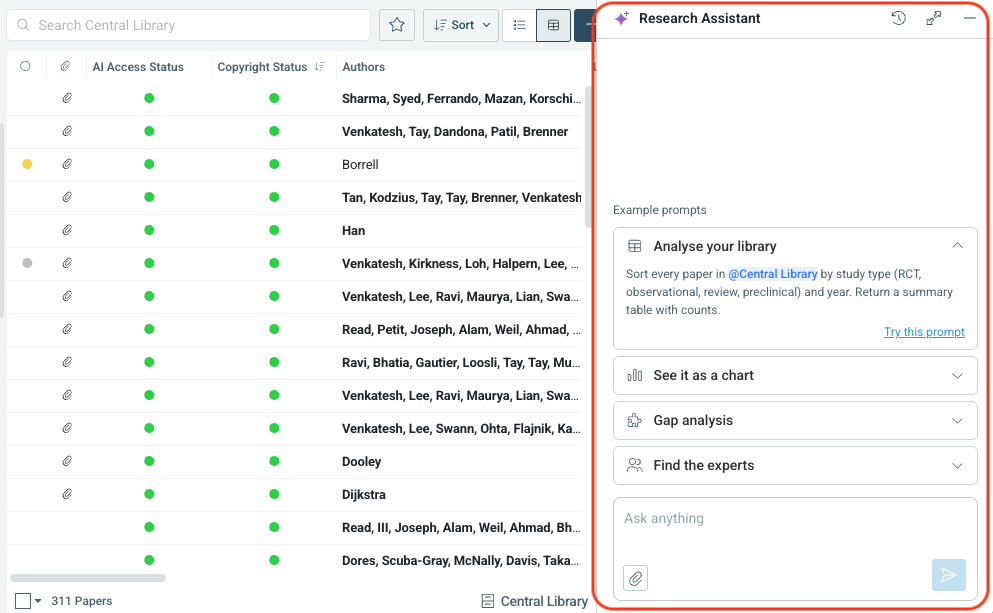
-
Library members with the “Manage Lists” permission can again rename lists in shared libraries from List Settings. Previously, this option was only available to library admins.
-
Fixed an issue where exporting items from some smart lists to CSV or Excel resulted in a blank screen.
-
In Research Assistant, clicking a citation that refers to an uploaded PDF which has since been deleted no longer leads to an error page.
-
In Research Assistant, the Clip and Export icons no longer overlap the conversation text when the right-hand panel is open.
-
Fixed an issue where annotations could disappear.
-
Fixed an error shown when returning to the Import list after importing the first of several PDFs.
-
Fixed an issue where starting a new search kept the previous search term.
-
Fixed an issue where references for some articles were listed as “null”.
-
Fixed layout issues in landscape on iPhone, where the Dynamic Island covered part of the PDF reader settings and navigation icons could appear distorted.
-
The search field in Browse Libraries is now disabled when there are no libraries to search.
An error occurredPlease try again later
-
Full query preview in search. The search popup now shows the complete query, including applied filters, so long queries are no longer cut off in portrait mode.
-
Redesigned Add to Library for bulk actions. Adding multiple items from the library, search results, or Recommendations now opens the redesigned Add to Library dialog, where users choose the destination library and lists, instead of saving directly to My Papers.
-
Total item count during selection. The status bar now shows the total number of items alongside the selection, for example “2 of 800 selected”.
-
Highlighter bar placement. The annotation bar no longer covers the top of the article while highlighting.
-
GSID opens in web view. Tapping a GSID identifier opens it in the in-app web view, in the same way as DOI and PMID.
-
iOS 27 support. The app has been updated for iOS 27, including fixes for distorted navigation and article detail icons.
-
Stability. Several errors reported in the previous version have been fixed, including an error that could occur when loading more search results.
An error occurredPlease try again later
Research Assistant on iOS.
Research Assistant is now available in the iOS app, with a design adapted from the web app for mobile. Users can start from suggested prompts or write their own, with prompts of up to 2,000 characters.
AI Chat with Papers on iOS.
Users can ask questions across up to 20 PDFs in a collection at once. Answers include references with supporting excerpts, and “Show evidence” opens the PDF at the passage the answer is based on.
AI Assisted Query Builder on iOS.
Search now includes an AI assistant that turns a plain-language request, such as “articles on mRNA from 2020”, into a structured search query.
Search filters.
Enterprise users with full text search can filter results by Authors, MeSH terms, and Publication Year. Authors and MeSH terms suggest matches as the user types, and Publication Year uses a simple year range. Applied filters become part of the query, so they are kept when a search is starred.
Starred searches, libraries, and lists.
Searches, libraries, lists, and Smart Lists can be starred and opened from a new Starred section in the navigation menu. Starred items stay in sync with the web app, including sort order.
Export PDFs with or without annotations.
PDFs can be exported with or without annotations as a bulk action from the library. Larger exports are processed in the background and sent as a download link by email.
Quick filter for lists. When the navigation panel contains many lists, a filter field makes it possible to find a list by name instead of scrolling.
An error occurredPlease try again later
Version 6.15.1 of the Chrome and Edge extension was released yesterday and is already live.
Fix: In Chrome 155 and new Edge, PDFs saved through the extension ended up as unreadable files. This is now resolved.
-
Clearer, more descriptive PDF file names — Downloaded PDFs are now automatically named using information from the page itself, instead of generic site names and timestamps, making it easier to recognize files at a glance.
-
Under-the-hood security and stability improvements — We made a number of behind-the-scenes updates to keep the extension secure, reliable, and running smoothly. No action is needed on your part.
-
PDF downloads from JAMA Network are working again — We fixed an issue where PDFs from JAMA Network journals would fail to download. You can now save these PDFs straight to your Papers library as expected.
-
PDF downloads from Sage journals are working again — We resolved a problem that was blocking PDF downloads from Sage journal pages, so you can once again pull PDFs into Papers without errors.
-
More accurate article matching on Dimensions — We corrected an issue where the extension could identify the wrong article on Dimensions pages. Matches are now accurate, so the right metadata and PDF get saved every time.
Organize the library directly from Research Assistant conversations.
Research Assistant now ties directly into the library workflow. While working in a conversation, users can ask it to create lists, tag items, and add items to the library or to lists, without leaving the chat to do it manually. Any changes are shown below the answer and logged in a new tab in the Assistant side panel, with links to the affected items and an option to export. This is enabled by default for all users with access to Research Assistant.
Bulk editing now includes custom fields.
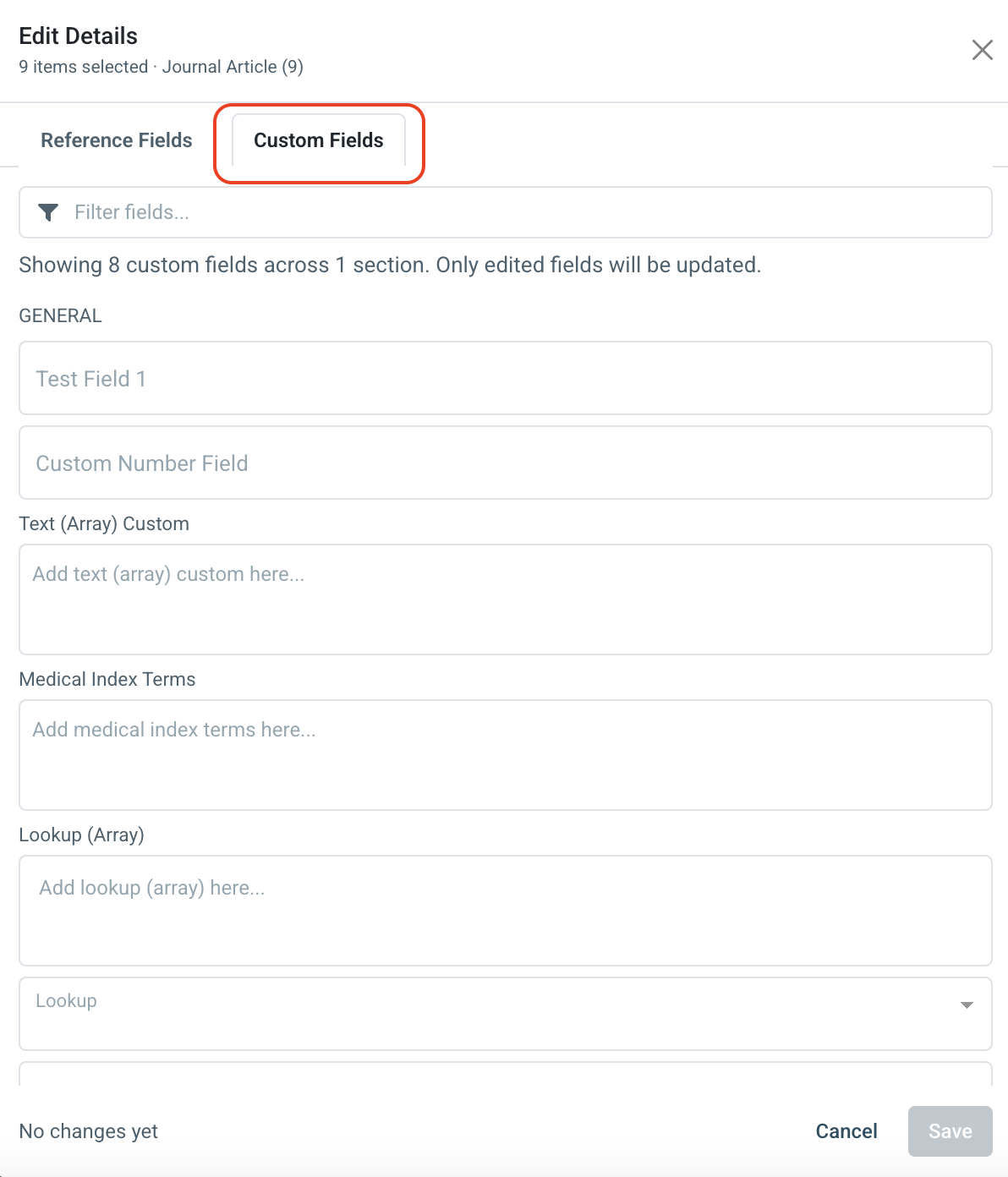
This completes the recent bulk metadata editing improvement, which made it possible to edit reference fields for multiple items at once. The Edit Details modal (Manage Details > Edit Details) now has separate Reference Fields and Custom Fields tabs, and a single Save applies changes from both. All custom field types are supported, fields where the selected items differ are marked as “mixed values”, and for list fields users can choose to add to each item’s existing values or replace them.
Enhancements
-
GSID search and editing. Items can be searched by GSID, both in the Search My Papers box using
gsid:"value"and through a new GSID field in advanced search. GSID can also be edited from an item’s Edit tab, in the same way as DOI and PMID. -
Clearer message for long search queries. Search queries that exceed the browser’s length limit now show a clear message asking the user to shorten the query, instead of a generic “under maintenance” message.
-
Smart List query length limit change. Smart List queries now have a maximum length of 7,000 characters.
-
Add to Library from the Grants side panel. Grants opened in the search side panel now include an Add to Library action, so a grant can be saved directly without going back to the results list.
- Fixed an issue where the Add to Library button in the patent side panel did not update after a patent was added, which made it possible to add the same patent again.
- Fixed an issue in Find & Access PDF where, in runs with more than 50 items, items could be marked as “PDF Linked” before the file was actually linked. Items are now marked as linked only once the link is confirmed, and items that cannot be linked continue to the regular download options.
- Fixed the alignment of the Open button for Literature Review on the Tools page.
Query parser with autocomplete and highlighting
SmartCite for Word now includes the same full query parser used in the web app, with autocomplete and query highlighting. It is available in both library search and article search.
Advanced search with query builder
SmartCite for Word now includes an advanced search with a query builder, available from a new option in the search dropdown, matching the field logic used in the web app for accounts with and without full-text search enabled. The previous helper dropdown has been removed.
Full-text search parity for article search
Article (global) search in SmartCite for Word now uses the same full-text data source as the web app when a user licence allows full-text search via Dimensions. Accounts without that setting continue to use the existing data source.
AI Query Assist
AI Query Assist is now available in SmartCite for Word when a user licence allows access to the feature. It is available in article (global) search only, and follows the behaviour as in the web app, transforming natural language into the search query.
Choose a list as the import destination
When resolving references in SmartCite for Word, users can now choose a list as the destination, not just the top-level library. This makes it easier to keep imported references organized when a library uses lists to separate projects, instead of everything landing in the library root.
Query parser with autocomplete and highlighting
SmartCite for Google Docs now includes the same full query parser used in the web app, with autocomplete and query highlighting. It is available in both library search and article search.
Advanced search with query builder
SmartCite for Google Docs now includes an advanced search with a query builder, available from a new option in the search dropdown, matching the field logic used in the web app for accounts with and without full-text search enabled. The previous helper dropdown has been removed.
Full-text search parity for article search
Article (global) search in SmartCite for Google Docs now uses the same full-text data source as the web app when a user licence allows full-text search via Dimensions. Accounts without that setting continue to use the existing data source.
Choose a list as the import destination
When resolving references in SmartCite for Google Docs, users can now choose a list as the destination, not just the top-level library. This makes it easier to keep imported references organized when a library uses lists to separate projects, instead of everything landing in the library root.
Bulk ordering: Review step for token purchases
Bulk PDF ordering now includes an “Available via Token” status for items that would otherwise be purchased automatically. These items wait in a new review screen until the user confirms, and users can navigate back to the results list without losing their selections.
Bulk ordering: “Available via Publisher” status
A new “Available via Publisher” status has been added to bulk PDF ordering for articles where the token purchase must be completed directly on the publisher’s website. Each article links out to the publisher’s site.
PDF export: Keep original file names
PDF export now offers the option to keep each file’s original file name instead of applying a naming convention. Items without a stored original name fall back to the naming convention, and the export dialog shows how many items will use the fallback.
Research Assistant: Citation styles tool
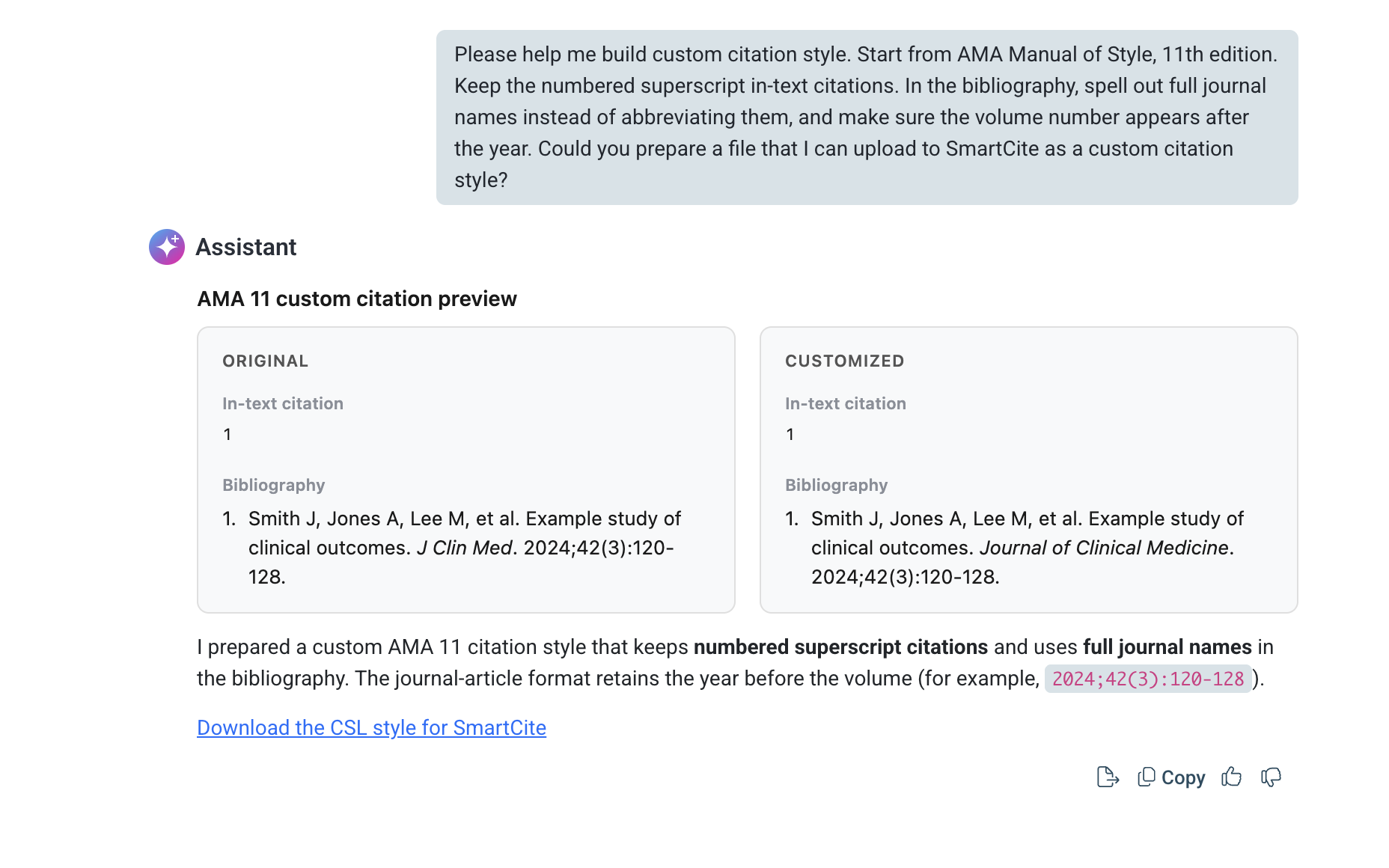
Research Assistant can now work with citation styles directly. Users can preview a style applied to an item, upload standard or custom CSL styles for review or editing, request a modified style to download, or generate a widget that compares how different styles render results.
Research Assistant: Dev mode displays token and context stats
Research Assistant now includes an optional dev mode that displays token and context usage stats for a conversation: totals at the top, and per-turn stats at the bottom of each exchange, with a separate popover for detailed context information. User can enable dev mode in My Account > Settings.
Enhancements-
Research Assistant now shows a live character count and disables the send button once a prompt exceeds the 12,000 character limit, instead of silently trimming the text. On accounts with file upload enabled, going over the limit also surfaces a tip suggesting the prompt be attached as a file instead.
-
Chat with Library now applies the same character limit handling. A live counter appears and the send button is disabled once the prompt goes over the limit.
-
Advanced Search is easier to find in the library search dropdown. The dropdown is now taller so the option is visible without scrolling, and a scrollbar appears whenever there is more content below.
-
Research Assistant now shows a fallback message if a response widget fails to render, rather than leaving a blank space.
-
Wording on the Tools page has been updated so AI-related features are clearly described as available where permitted by license, reducing confusion for users without AI access.
-
Fixed an issue where the AI query builder could generate a full-text search query on accounts that have full-text search disabled, causing the resulting search to behave unexpectedly.
-
Fixed an issue where the date picker could appear hidden behind the Advanced Search window when entering a date or date range.
Delete or replace a PDF within a Literature Review project
Reviewers and admins can now delete a reference’s PDF directly inside a Literature Review project, with a confirmation step before it’s removed. This only removes the PDF from the project, not from the Library copy, and a new PDF can be added afterward. PDF additions and deletions are now recorded in the project’s audit log, along with who made the change and when.
Copyright status visible in Literature Review
When an organization has copyright status turned on for the app, that status now also appears as a column in the Literature Review references view, placed after Authors. The column is sortable and only appears for organizations with the setting enabled.
Article upload tracking per project
The project Info tab now includes a section showing how many articles have been uploaded to the project over time. Admins can select a date range to see the total for that period alongside a month-by-month breakdown, with the all-time total shown by default when no range is selected. This makes it possible to compare upload activity across periods, for example Q1 against Q2.
Template usage tracking
The template detail page is now split into two tabs, Info and Form editing. The new Info tab contains a “Projects using this template” section where admins can select a date range and see how many active and archived projects were running on the template during that period, together with a list of those projects showing name, status, and the date each became active or was archived. Without a date range, all projects that have ever used the template are shown with an all-time count.
Quality feedback prompt for AI Autofill
SLR extraction forms can now show a brief feedback prompt after AI Autofill completes, appearing below the answer it applies to. Users can rate the answer with a thumbs up or down; thumbs down expands to a short list of reasons (for example, an incorrect, invented, or incomplete value) plus an optional note. The prompt appears for a small sample of autofills and no more than once per user per week, so it stays occasional rather than overwhelming.
AI Autofill “reviewer” traceability in reports and the review log
Reports and the review log can now show whether AI Autofill was active when a reviewer saved a stage. The review log records this alongside each save, and the Full, Inclusion, and Exclusion reports, as well as the custom report builder. This reflects whether the reviewer who saved the answer ran Autofill themselves, not whether the answer carries AI suggestions from an earlier save, so a reviewer who opens and saves someone else’s autofilled answer without running Autofill is not credited with the AI assistance. It does not show whether the AI-suggested answer was kept or changed.
AI provenance recorded on every answer
For customers with compliance requirements around AI use, ReadCube now records provenance on every AI-assisted answer: which model produced the suggestion, which reviewer ran Autofill, and whether the reviewer accepted the suggestion, edited it, or went against it. This gives regulated customers evidence of both which system produced a value and whether a reviewer exercised judgment over it.
-
A new “Sync document with library” action is available in SmartCite Options.
It brings every reference cited in a document into a single library of the user’s choice and updates the document’s citations to point at that library, so a document written over time or shared between colleagues no longer depends on references scattered across personal and shared libraries. Before anything changes, SmartCite shows a plain-language plan of what will happen to each reference (already present, copied from another library, recreated from stored metadata, or looked up online), and the bibliography is regenerated once the sync completes. References that cannot be found anywhere are left untouched and reported, so nothing disappears from the document silently.
-
Dropdown inputs across SmartCite (language selector, default destination library, sync destination library, chapter selection when editing an inline citation, and narrative citation override) now use a consistent custom style in place of native browser drop down menus, matching the rest of the ReadCube apps.
-
The Options screen has been updated with a refreshed layout for its list of settings.
-
The browser extension now supports EBSCO integration. For organisations where full text access is set up through EBSCO, the extension can download PDFs and save articles to users’ libraries directly from EBSCO article pages.
An error occurredPlease try again later
-
When adding a new reference, lists and tags selected during the previous import are no longer carried over silently. Users can review and clear the previous selection before saving, which prevents references being filed under lists or tags chosen for an earlier item.
-
Injectable buttons on Annual Reviews pages now display correctly on smaller screens, such as laptop displays, where they previously appeared misaligned.
-
Access log entries now consistently record the publisher, including cases where it could not be detected automatically. This gives administrators more complete publisher-level reporting on access activity.
-
Fixed an issue where article requests falling outside an organization’s holdings date range were recorded as access failures. These requests are now correctly identified as outside holdings, so the access log reflects genuine failures only.
-
Fixed an issue where injectable buttons did not appear on ASH Publications search results pages, even when DOIs were present.
-
Fixed an issue where PDF downloads failed for articles from BMJ.
-
Fixed an issue where the tag selection window was truncated when adding a tag to a reference.