Release Notes
Highlights: PDF-related highlights
PDF-related highlights are now supported. Users can highlight text directly within the PDF viewer, with highlights stored and accessible alongside annotation notes.
An error occurredPlease try again later
-
Star ratings can now be applied as a single or bulk action from the Organize menu, allowing users to rate one or multiple papers at once without opening each paper individually.
-
In the Discover Browser Library view, navigation options are now active even when no libraries are visible, allowing users to browse and add content without requiring an existing library in view.
-
Links in the Metrics tab now open in a new browser tab, keeping the user’s current context in the application while reviewing external metric sources.
-
Search input fields are now consistent in length across the application, providing a more uniform interface.
-
The full-text indicator has been removed from the Query preview in Filtered List, simplifying the display and reducing visual noise in query summaries.
-
Sorting options across the navigation bar have been improved for more consistent and predictable behavior.
-
Fixed an issue where the star button on the library header occasionally displayed as unstarred for libraries that had been starred.
-
Fixed an issue where library header action buttons were rendering on top of the PDF preview overlay.
-
Fixed a text wrapping issue in breadcrumb navigation.
-
Fixed keyboard navigation in the query parser recents and autocomplete dropdowns, ensuring consistent behaviour when navigating suggestions with arrow keys.
-
Fixed an issue where the Research Assistant chat session was not resetting when the tab was closed and reopened.
-
Fixed an error that could occur when restoring tabs if user preferences had not yet fully loaded.
-
Fixed an issue where the Query Assistant rejected queries beginning with the NOT operator. Such queries are now processed correctly.
-
Fixed an issue where using the AND operator in a combined full-text and custom metadata search in Filtered List returned unexpected results.
-
Resolved an issue where certain errors were not captured correctly. Error handling has been strengthened to improve reliability.
-
The save article and save webpage flows now respect collection-level write permissions. When a user does not have permission to add items to a selected collection, the save option is disabled in the extension. The standalone tag editor is similarly disabled when the user lacks tagging permission on that collection.
-
When a captcha is detected during PDF download from LWW (Wolters Kluwer), the extension now recognises the captcha and brings the relevant tab into focus so users can complete it, rather than silently failing.
An error occurredPlease try again later
-
PDF auto-download was not triggered when saving an article to a library at organisations with the “disable open access download” setting enabled, even for articles that were not open access. The setting now applies only to open access content, as intended. Users at affected organisations will see PDFs download automatically again for subscription and IP-authenticated articles.
-
PDFs from publishers that serve content with the application/download content type failed to save due to a hash mismatch during upload. These PDFs now save correctly.
-
Articles accessed through ezproxy URLs were not being resolved by the extension, so the article panel did not appear. Direct and proxy access to the same article now behave consistently.
-
On Safari, PDF access attempts for Elsevier articles were generating errors related to following redirect chains, which in some cases prevented the correct PDF URL from being resolved. This has been corrected.
-
A parsing error in Firefox caused by malformed or empty response data has been resolved. This error was surfacing for some users when the extension processed certain page responses.
-
A parsing error in Safari caused by an unexpected response format has been resolved.
-
In Firefox, an error related to missing host permissions when the extension attempted to interact with certain tabs has been addressed.
Inline Query Assistant in global search.
The search bar now surfaces query syntax as users type, including parameter typeahead (e.g. author:, year:, meshterm:), operator suggestions, and real-time error detection. Users no longer need to open Advanced Search to build structured queries.
Inline Query Assistant in library search.
The same syntax-aware query assistant is now available in the library search bar, with parameter typeahead that includes collection-specific custom fields. The legacy Query Parser Search modal, which was available to admins and developers only, has been retired.
Research Assistant: Search past chats.
Users can now search across their Research Assistant chat history directly from the Research Assistant sidebar. A search popup filters results as the user types, highlights matching terms in chat titles, and lets users jump to any previous conversation.
-
Filtered list: query preview with one-click copy. When building a filtered list, a read-only Query Preview field now shows the combined full-text and library-specific query assembled in real time. A copy button lets users capture the full query string in one click, useful for documenting search syntax in regulatory workflows.
-
Filtered list: library-specific parameters can be used independently. The Dimensions full-text query field is now optional when building a filtered list. Users can submit searches using only library-specific parameters (such as custom metadata fields), which was not previously possible.
-
DocDel: consolidated PDF action menu. For document delivery customers, the “Locate PDF” action has been removed and the “Get PDFs” action has been renamed to “Find & Access PDF.” This applies to the right-click context menu, bulk actions, and the import from identifiers options.
-
Year filter improvements. The publication year filter now defaults to the current year rather than 1900, and out-of-range values are handled more clearly so users can understand why a filter may not return results.
-
BibTeX export: special characters preserved in cite keys. Colons, hyphens, and underscores in cite keys are no longer stripped during BibTeX export. These characters are valid in BibTeX syntax and were previously removed in error.
-
List permission enforcement corrected. Users with shared library access but without the “Manage Lists” permission could previously move items between lists using the Move to… action, bypassing the permission model. This has been corrected across all surfaces where the Move action appears.
-
Annotations filter no longer persists across articles. When navigating between articles, the text filter applied in the Annotations tab of the info panel now resets correctly rather than carrying over from the previous article.
-
Author column sorts hyphenated names correctly. Hyphenated author names are now sorted by the first part of the name rather than the second, restoring expected alphabetical order in library list views.
Research Assistant: example prompts
Research Assistant now shows a gallery of 12 example prompts when starting a new conversation. The prompts cover a range of use cases, including library scoping, patent search, and structured output, and are a good starting point for users who want to explore what is possible. Clicking any prompt loads it into the input so it can be edited before sending.
Search Filters
The Authors and MeSH terms have been aded to filters in the search module, next to the , and Publication year. All three are easy to apply: Authors and MeSH use a typeahead input, and Publication year takes a simple year range. Applied filters are reflected in the search field and are saved when creating a Starred Search or Feed. Available to Enterprise users, with the “Full text Search” enabled feature.
EnhancementsSearch Sections
The section scope options (Exclude references, Materials and methods) are now visible directly in the search interface, rather than inside the filters menu. A note in the Save Search and Feed modals reminds users that section settings apply to the current search only and are not saved.
Bug Fixes-
Mendeley authentication now completes correctly regardless of how long the user takes on the Mendeley login page.
-
The “Migrating from Mendeley” help link now routes to the correct help centre for each product.
Web Application Domain Migration: Following the successful transition of all users to the current web application over the past 18 months, the platform is returning to the primary flagship domain. The web application is moving from newapp.readcube.com back to app.readcube.com. While redirects are in place to ensure a user is not impacted and can continue working without interruption, it is recommended to update any saved bookmarks to the new address as a matter of best practice.
New Features
Research Assistant for ReadCube Pro The Research Assistant has officially transitioned out of the beta phase phase and is now available as a feature for premium ReadCube Pro license holders. This tool provides advanced AI-driven capabilities for literature discovery and analysis directly within the workspace.
Supplementary File Support for Bulk Export The bulk PDF export feature now includes an option to incorporate supplementary files. This allows the user to download all associated research materials alongside primary documents in a single action, ensuring a more comprehensive data retrieval process.
Improvements
Refined Library Organization Workflow The interface for moving and copying items has been updated to provide greater clarity regarding library permissions. If a user doesn’t have permission to delete items in a library, the “Move to” option is hidden at the library level and remains available only at the list level. This change accurately reflects that items remain in the source library while being organized into new collections, preventing confusion regarding item ownership and placement.
Optimized Research Assistant Streaming The Research Assistant interface has been updated to handle data streaming more efficiently. This technical refinement ensures that AI-generated answers appear more smoothly and responsively during the research process.
Search Filter Defaults To improve search performance and provide more comprehensive initial results, the “Exclude references” filter is now deselected by default. The user can still choose to apply this filter manually when refined results are required for a specific query.
Bug FixesShared Library Access A fix has been implemented to resolve an issue where an “action_not_permitted” error occasionally appeared when accessing shared library settings. The user can now manage these settings without interruption.
In this release, we have focused on enhancing the stability, interface layout, and overall navigation experience. These updates ensure a more reliable workflow for researchers and professionals, particularly those using iPad devices and the latest iOS versions.
Improvements
iPad Interface Optimization The placement and responsiveness of buttons on the iPad have been refined, specifically within the search interface. This update ensures that interactive elements are more accessible and behave consistently across different iPad models, providing a more intuitive experience during literature discovery.
Bug Fixes
Search and Navigation
-
Navigation Flow: Resolved an issue where a user could become unable to return to the library from the search landing page. This fix ensures seamless transitions between library management and search activities.
-
Search Page Stability: Addressed a crash that occurred when removing search terms or interacting with the search popup. These improvements provide a more robust experience during complex search sessions.
-
Landscape View on iPad: Fixed a layout bug in iPad landscape orientation where the keyboard would occasionally overlap the search bar, ensuring the search input remains visible while typing.
PDF Reading and Annotation
-
Google Scholar Integration: Fixed a crash that occurred when a user attempted to use the Google Scholar tool after selecting text within the PDF reader. This ensures uninterrupted citation lookups and external research.
-
Annotation Reliability: Resolved an issue where adding an annotation from selected text could lead to an unexpected application exit.
-
Literature Import: Addressed a bug in the PDF import workflow where downloading and adding new files from external sources like Google Scholar would encounter errors. This fix ensures a smooth process for expanding a library with new research materials.
Interface and Metadata
-
Visual Polish for iOS 18: Corrected UI elements on iOS 18 where organization titles and recommendation headers were previously cut off or missing.
-
Metadata Accuracy: Fixed the formatting of author names and the alignment of metadata lines in the list view. These corrections ensure that bibliographic information is presented clearly and professionally.
-
Header Layout: Resolved an issue on iPad where the menu title and logo could overlap with the device status bar, improving the readability of the main navigation menu.
System Stability
-
Startup and Loading: Fixed a rare startup issue on iPad devices and addressed an error that caused the application to hang during the initial loading of data in the library list.
-
Background Management: Resolved a crash that could occur when a user returned to the application after it had been in the background, specifically when interacting with library sections.
-
App Notifications: Addressed an internal error related to the delivery of in-app notifications to improve background stability.
-
Onboarding Experience: Fixed a bug where help tips and onboarding prompts on the library screen could not be dismissed, allowing for a cleaner workspace once the user has completed the tutorial.
AI Autofill for Subforms
AI-assisted data entry is now supported within subforms, extending the automated capabilities that were previously limited to main forms. A user can populate sub-sections automatically using the autofill button, which streamlines the literature review process and reduces the need for manual data entry. To maintain accuracy and oversight, a user can verify any AI-generated content by selecting the magic icon and providing manual adjustments if necessary.
Subform Naming Validation
The platform now includes validation to prevent the creation of duplicate subforms names within the same project. When a user edits a project during the review phase, the system ensures that each new subform has a unique name. This improvement maintains data integrity and prevents confusion by ensuring that subforms are clearly distinguishable from one another.
‘Publication Year’ Filter in Search
The user can now refine search results within the full text search module using Publication Year. This is designed to help enterprise users navigate large volumes of literature and identify relevant research more efficiently.
References and ‘Materials & Methods’ Exclusion in Search
To improve the precision of search results, a new option has been added to exclude specific sections like the Bibliography or “Materials & Methods” from the search process. When this toggle is enabled, the search query only matches against the core content of an article, ensuring that results are focused on primary findings rather than peripheral citations or methodological details.
Bulk PDF Export from Library
A new bulk action is available in the library menu that allows the user to export multiple PDFs at once. This update standardizes the export experience across web and desktop applications.
Reliability of Bulk Operations
Several updates have been made to ensure bulk actions are more dependable. The “Select All” functionality now correctly processes the entire selection when copying or moving files between folders by using drag/drop action. Additionally, the system now handles the cancellation of bulk processes gracefully, preventing unexpected error messages.
Accurate PDF Export Naming and Scoping
The bulk PDF export tool has been corrected to ensure that file names are generated properly when using the publication year token.
Interface Consistency and Stability
Updates to the library workspace ensure that selected items remain visually highlighted while sorting or updating queries. The action footer also correctly updates its state when a search returns no results, providing a more predictable experience.
Research Assistant DOI Resolution
The AI Research Assistant has been updated to more accurately identify and process DOI links. The system now automatically filters out common formatting characters, such as brackets and periods, that may be inadvertently included in a link. This refinement ensures that literature identification remains consistent and reduces errors when users access documents through the assistant.
EndNote Import Tagging
A correction has been made to the reference import process for EndNote. Previously, tags assigned during the import were not being consistently applied to the resulting references. This update ensures that all tags are correctly assigned, allowing for proper organization and metadata management of new literature within the library.
Enhanced Group Email Notifications
Email notification management for group-based libraries has been refined. Group members will now see their shared libraries and lists within their account notification settings. Additionally, the system is preventing duplicate emails for individuals who are members of both a group and the library directly.
Improved Filtered List Error Handling
The process for creating filtered lists has been updated to handle search query issues more gracefully. Instead of a general interruption, the system now provides specific feedback if a query is invalid, ensuring that the user is informed of the exact reason for the error.
Filtered List Cancellation Workflow Optimisation
The filtered list creation dialog has been corrected to prevent unnecessary error popups when a user manually stops the process immediately after it begins.
General Platform Stability
Several background issues have been addressed to improve overall application performance. These include resolving a memory leak in the PDF viewer, ensuring correct article status persistence, and preventing the accidental removal of articles from lists during AI filtering operations.
Unified Email Notifications and AI Summaries
The email notification system has been redesigned to provide a more cohesive experience for both users and administrators. Regular notifications and AI-generated summaries are now unified into a single feature, allowing for easier management of content and frequency. Administrators have gained the ability to manage notification settings for all library members more granularly, while individual users can now view and adjust their specific library alerts directly from their account settings. To ensure better visibility, a new option allows users to receive a status email even when no new items are added, providing confirmation that the library remains up to date.
Transparent Bulk Actions
To provide better visibility into large-scale operations, success notifications now include a precise count of the items processed. Whether a user is deleting papers or linking files in bulk, the interface clearly indicates the specific number of items successfully affected by the action.
Search and Organization Refinements
The bulk “Add to List” tool now includes a search function and item counts, making it easier to organize large collections. For users utilizing advanced filtering, the system now provides immediate feedback if a query is invalid, preventing silent failures and helping users correct their search terms quickly.
Enhanced Interface Responsiveness
The speed of the application has been improved by optimizing the way data refreshes after specific actions. Operations such as removing items from a list, updating AI access, or resolving duplicate entries now reflect changes instantly. This update removes unnecessary waiting periods during common tasks, resulting in a more fluid and efficient workflow.
Bug FixesA fix has been implemented to handle instances where a user navigates to a collection or list that has been deleted. Instead of a silent redirect, a clear notification dialog now explains the status of the resource, which reduces confusion when users access old bookmarks.
Corrected Permission Enforcement
An issue was resolved where the “Link Existing Files” permission was not consistently checked when using the PDF button in the side panel. This ensures that access controls are applied correctly across all parts of the platform.
General Interface and Accuracy Fixes
Several refinements have been made to the user interface to ensure a consistent experience:
-
Read indicators now update immediately when a user views a PDF from the sidepanel.
-
The “Remove from list” action has been restored to the footer menu for better accessibility during bulk selection.
-
Search results are now correctly cleared when the user navigates back to the main library view.
-
Sub-collections in shared libraries are now displayed in the correct alphabetical order.
Multi-Level AI PDF Summaries for Enterprise Users
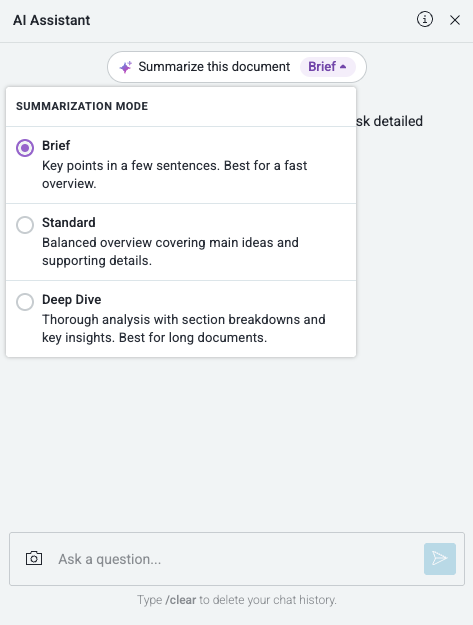
Enterprise users with access to ReadCube’s AI Assistant can now tailor how PDFs are summarized with new AI summary modes. The Summarize button is available wherever Chat with PDF is enabled, allowing a preferred summary depth to be selected before generating
-
Brief (default) for a quick overview,
-
Standard for a balanced summary, or
-
Deep Dive for a more detailed analysis.
After a summary is generated, it can be rerun in another mode to explore the document at a different level of detail without starting over.