
Release Notes
-
A new “Sync document with library” action is available in SmartCite Options.
It brings every reference cited in a document into a single library of the user’s choice and updates the document’s citations to point at that library, so a document written over time or shared between colleagues no longer depends on references scattered across personal and shared libraries. Before anything changes, SmartCite shows a plain-language plan of what will happen to each reference (already present, copied from another library, recreated from stored metadata, or looked up online), and the bibliography is regenerated once the sync completes. References that cannot be found anywhere are left untouched and reported, so nothing disappears from the document silently.
-
Dropdown inputs across SmartCite (language selector, default destination library, sync destination library, chapter selection when editing an inline citation, and narrative citation override) now use a consistent custom style in place of native browser drop down menus, matching the rest of the ReadCube apps.
-
The Options screen has been updated with a refreshed layout for its list of settings.
-
The browser extension now supports EBSCO integration. For organisations where full text access is set up through EBSCO, the extension can download PDFs and save articles to users’ libraries directly from EBSCO article pages.
An error occurredPlease try again later
-
When adding a new reference, lists and tags selected during the previous import are no longer carried over silently. Users can review and clear the previous selection before saving, which prevents references being filed under lists or tags chosen for an earlier item.
-
Injectable buttons on Annual Reviews pages now display correctly on smaller screens, such as laptop displays, where they previously appeared misaligned.
-
Access log entries now consistently record the publisher, including cases where it could not be detected automatically. This gives administrators more complete publisher-level reporting on access activity.
-
Fixed an issue where article requests falling outside an organization’s holdings date range were recorded as access failures. These requests are now correctly identified as outside holdings, so the access log reflects genuine failures only.
-
Fixed an issue where injectable buttons did not appear on ASH Publications search results pages, even when DOIs were present.
-
Fixed an issue where PDF downloads failed for articles from BMJ.
-
Fixed an issue where the tag selection window was truncated when adding a tag to a reference.
-
A new “Sync document with library” action is available in SmartCite Options.
It brings every reference cited in a document into a single library of the user’s choice and updates the document’s citations to point at that library, so a document written over time or shared between colleagues no longer depends on references scattered across personal and shared libraries. Before anything changes, SmartCite shows a plain-language plan of what will happen to each reference (already present, copied from another library, recreated from stored metadata, or looked up online), and the bibliography is regenerated once the sync completes. References that cannot be found anywhere are left untouched and reported, so nothing disappears from the document silently.
-
Dropdown inputs across SmartCite (language selector, default destination library, sync destination library, chapter selection when editing an inline citation, and narrative citation override) now use a consistent custom style in place of native browser drop down menus, matching the rest of the ReadCube apps.
-
The Options screen has been updated with a refreshed layout for its list of settings.
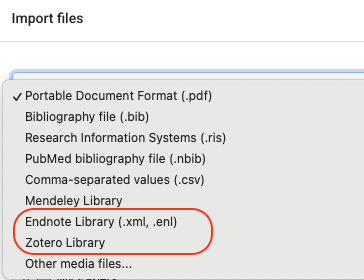
- EndNote and Zotero import in the web app.
EndNote and Zotero library imports are now available directly in the web app, previously only possible in the desktop app. Records, list structures (EndNote groups, Zotero collections), and PDF attachments are all imported, with processing handled locally in the browser. - Admin control for Research Assistant file upload.
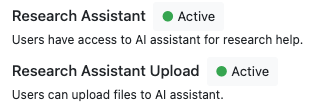
Organizations can now control whether the file upload option is available in the Research Assistant. This gives administrators oversight of which content is used with AI features. The option is enabled by default and can be adjusted on request.
An error occurredPlease try again later
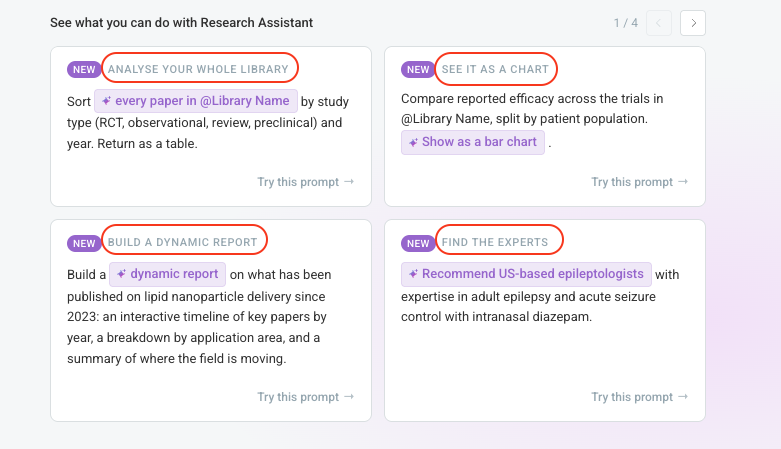
- Prompt gallery updated with new Research Assistant capabilities.
Four new example prompts, marked with a NEW label, were added to the Research Assistant prompt gallery to introduce recently added capabilities: whole-library analysis, charts and other visuals in answers, dynamic reports combining summaries with interactive elements, and expert identification based on publication records. - Default sort for public lists.
Public lists now support a default sort order. When sharing a list, or editing an already shared one, users can configure the sort with which the public list opens for viewers. Existing shared lists default to title, ascending. - Progress status for long-running Research Assistant tasks.
The Research Assistant now shows progress status during long-running tasks, such as analyses across large libraries, so users can see that work is still in progress instead of a static loading indicator. - Imports respect the destination list.
Imports from EndNote, Zotero, and Mendeley now respect the destination list selected in the import modal. Imported items are added to the chosen list and the imported folder structure is created nested under it, rather than at the root of the sidebar. This applies to both the web app and the desktop app. - Clearer duplicate merge message on import.
The “duplicates merged” message shown after an import now clarifies that duplicates are detected across the whole library, not only within the folder selected for the import. - Updated Training link.
The Training link in the app now points to the updated learning portal at learn.readcube.com. - Research Assistant layout refinement.
Increased the spacing between the action bar and the next question in Research Assistant conversations, making it clearer which answer the actions belong to.
-
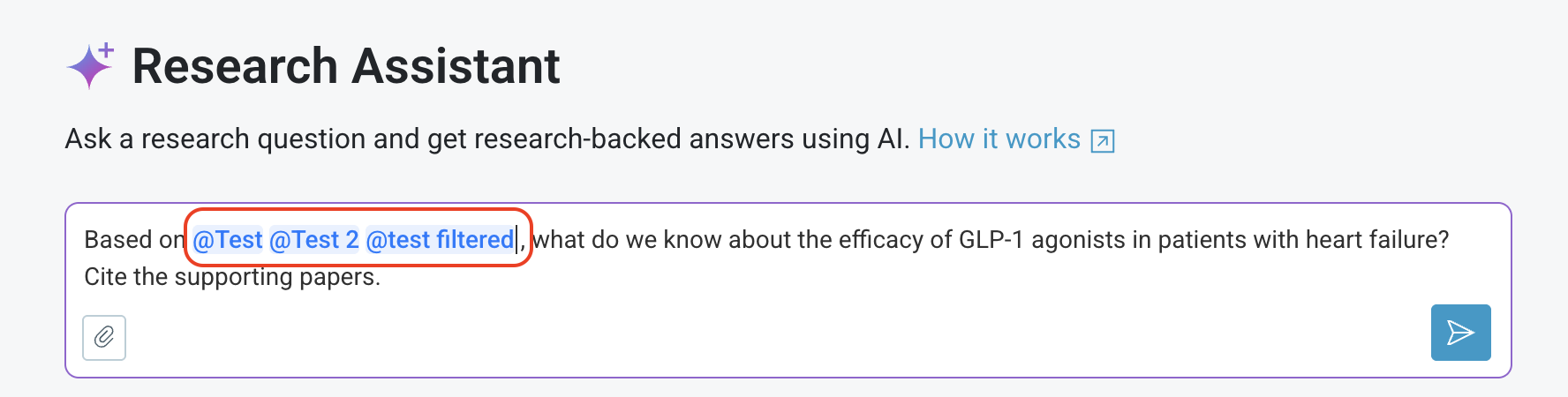
Fixed an issue where typing an “@” character in the Research Assistant message box would open the library mention dropdown and intercept the Enter key, causing the message to remain unsent and text after the “@” to be lost.
-
Fixed an issue where the exact match setting was not applied to the full text portion of the query when creating a filtered list, so results could include non-exact matches.
-
Restored feed tracking columns in library exports. Items added through feed auto-deposits are again identified in exported files.
-
Fixed the info icon next to the “Exact match” option in the Edit Smart List dialog, which was not showing any explanation of the difference between Stemmed and Exact match search.
-
Fixed a display issue where Research Assistant notifications containing a library or list mention were not rendered properly.
- Fixed citation formatting for styles that define language-specific rules within the style itself, such as APA 7th edition. Previously, SmartCite did not apply these in-style language overrides, which could result in incorrect localized terms in citations (for example “u. a.” appearing instead of “et al.”). Citations now render correctly according to the selected language for these styles.
-
A new Advanced Settings screen is available from the Options screen (opened via the gear icon), grouping less common settings into one place. It currently includes a default destination library setting, letting users choose which library new SmartCite items are created in (for example, items added from search or recovered after being deleted). The default is the personal library (“My Papers”).
-
SmartCite icons have been updated to match the new design used in the ReadCube web app, giving the extension a more consistent look and feel.
-
References to “Papers” branding have been updated to “ReadCube” throughout the extension, including the login and subscription screens and various notification messages.
-
Fixed citation formatting for styles that define language-specific rules within the style itself, such as APA 7th edition. Previously, SmartCite did not apply these in-style language overrides, which could result in incorrect localized terms in citations (for example “u. a.” appearing instead of “et al.”). Citations now render correctly according to the selected language for these styles.
-
Fixed an edge case where the Edit Citation and Edit Reference icons could overlap when a citation was selected, making both hard to use.
Citation disambiguation with hyperlinked bibliography
When a document contains multiple references by the same author and year, citation styles automatically add distinguishing suffixes to the year (for example, Smith, 2020a and Smith, 2020b). This disambiguation has been improved for documents with hyperlinks to the bibliography enabled: suffixes now update correctly in the bibliography, and inline citation links point to the correct entry.
An error occurredPlease try again later
Bulk Edit Metadata
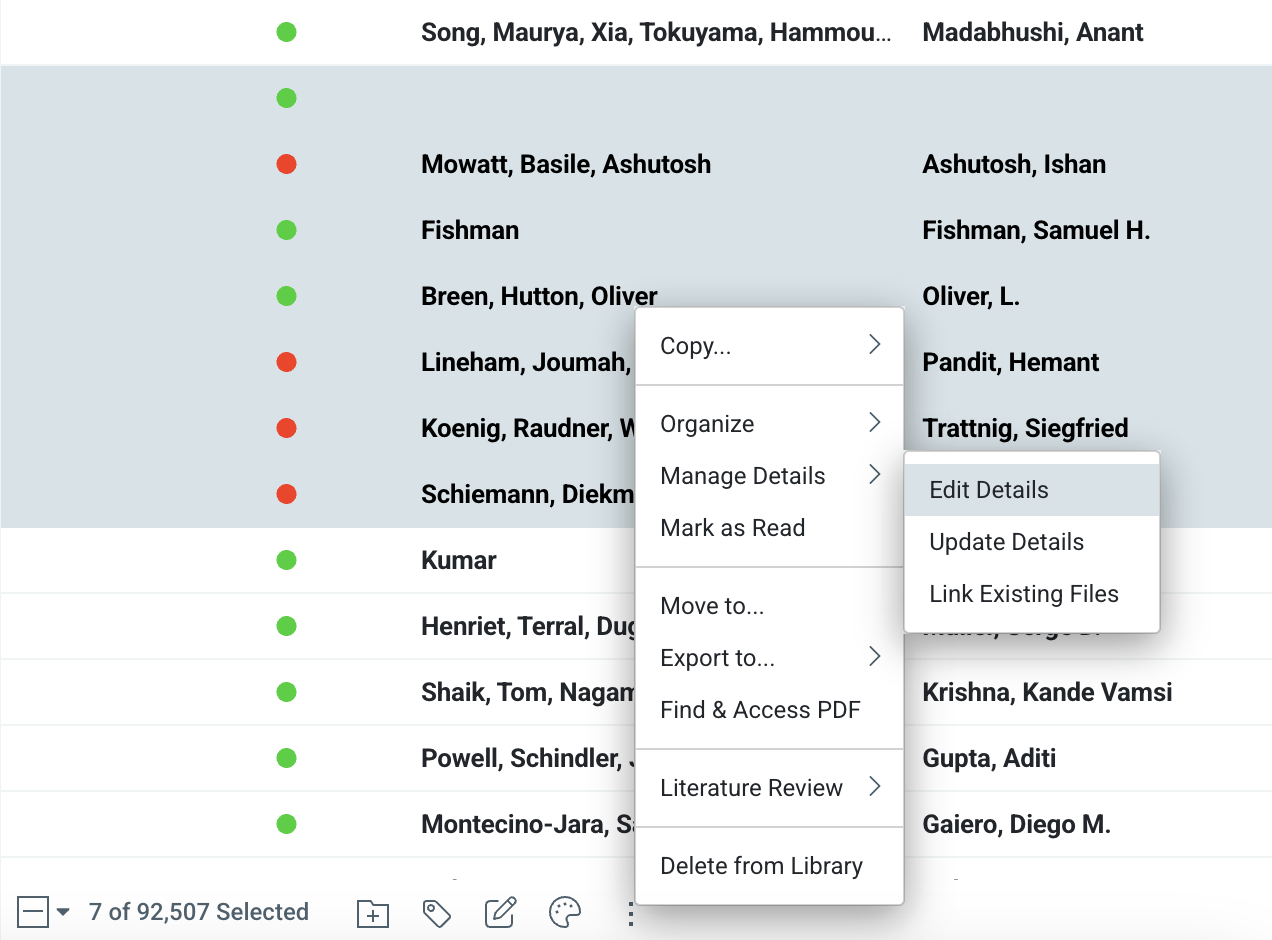
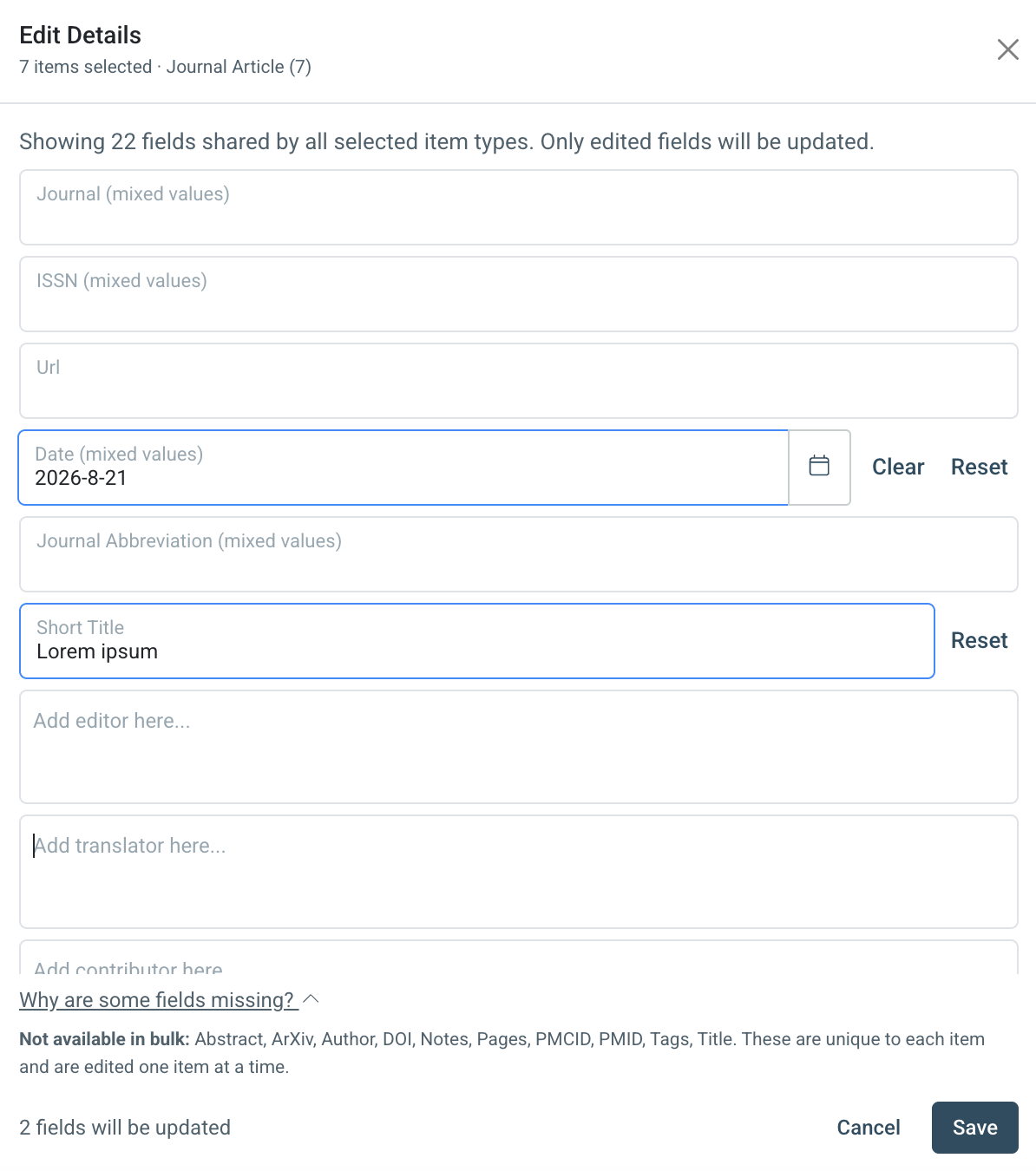
It is now possible to edit metadata for multiple items at once. Select several items and choose Edit metadata from the bulk actions menu. The dialog shows only fields shared by all selected item types, marks fields with differing values as mixed, and only writes fields that are actively edited, so nothing is accidentally overwritten.
Multiple Libraries Mentions in Research Assistant
Research Assistant questions can now reference multiple libraries or lists in a single question. Previously each question was limited to one mention.
Syntax Highlighting for Code blocks in Research Assistant
Code blocks in Research Assistant responses now render with color-coded syntax highlighting, a language label, and a one-click copy button. Over 20 common languages are supported, including Python, R, MATLAB, JavaScript, and SQL. Unsupported languages still display as clean, readable plain code.
An error occurredPlease try again later
-
The Research Assistant question input limit increased from 3,000 to 12,000 characters, allowing longer and more detailed questions.
-
Text in Research Assistant responses can now be selected and copied directly, in addition to the existing Copy and Export options.
-
Public list links are now generated on the http://readcube.com domain (http://public-lists.readcube.com ) instead of http://papersapp.com. Existing links created with the previous domain redirect automatically, so nothing already shared will break.
-
Fixed an issue where an empty Research Assistant response could appear after rating an answer and refreshing the page, which also caused errors when copying or exporting that response.
-
Fixed several formatting issues in Research Assistant responses, including bold and italic text not rendering together correctly and problems with mathematical notation display.
-
Links in Research Assistant answers now open in a new tab, so the conversation stays in place instead of being replaced by the linked page.
Research Assistant
The Research Assistant received the largest share of updates in this release.
-
File upload: Files can now be attached to a chat directly from the user’s device. Supported formats are indicated on the attach icon, and clear warnings appear for unsupported formats or files that exceed the size limit.
-
Rich answer rendering: Answers now render richer content: charts display as interactive elements rather than static images, dynamic widgets are supported, mathematical expressions and equations render correctly, and code snippets are properly formatted.
-
Nudges: Users can add a follow-up question while an answer is still being generated, and the response adjusts to take it into account. Nudges can be turned on or off in the account settings.
-
Conversation export: Conversations can now be exported to Word or PDF, including graphs and visualisations.
-
Individual answer export: Individual answers can also be exported on their own. An Export action is available below each answer that does not contain a dynamic widget.
-
Navigation map: A navigation map has been added to chats with three or more question and answer pairs, making it easier to jump to a specific exchange in longer conversations.
Search Sources
Search now supports selecting the source a query runs against: the ReadCube full text index (default), Publications, Patents, Clinical Trials, Grants, or Datasets. A source selector is available when starting a new search and on the results screen, and each source offers its own relevant filter controls, for example jurisdiction, legal status, and language for Patents, or condition and gender for Clinical Trials. The search query input and the Advanced Search query builder also adapt to the selected source, with field validation and autocomplete reflecting the fields available there. Availability of the additional sources depends on the organization’s license.
An error occurredPlease try again later
-
The account settings page has been reorganised to make individual settings easier to find, including the new option to enable or disable Research Assistant nudges.
-
ReadCube is now available as a source option in the Add to Literature Review dialog, and the selection is reflected in the Literature Review.
-
When importing papers that already exist in a library, a notification now indicates that duplicates were merged, matching the behaviour already in place when copying papers between libraries.
-
The Advanced Search and AI Filter popups now open as standard in-app modals, consistent with the rest of the application, and the page URL no longer changes when they are opened or closed.
-
Dropdown controls across the application now consistently indicate their open and closed state.
-
Fixed a crash in the Add to Library modal that could occur when collection data was temporarily unavailable.
-
Fixed an issue where users whose accounts were unlinked from SSO could get stuck at the email verification step when setting a new password.
-
Several side panel fixes: duplicate error modals no longer appear when opening a deleted paper, a loading spinner no longer gets stuck in the search side panel, and the library now refreshes correctly after importing references.
-
PDF downloads from several publishers (including ScienceDirect, Wiley, Science, NEJM, ASH Publications, and RSNA) are now completed in a browser tab instead of in the background. This improves download success rates on sites where publisher security checks previously interrupted downloads.
-
The extension has been renamed from Papers by ReadCube to ReadCube. This covers the extension name, toolbar tooltip, buttons, logos, and support links, while the extension icon and all functionality remain unchanged.
An error occurredPlease try again later
-
Fixed an issue where articles from Wolters Kluwer (Ovid) journals could fail to download or incorrectly show a purchase option for users whose organization subscribes to the journal. Subscribed content now resolves correctly through the organization’s holdings.
-
Organizations can configure a second link resolver. When two resolvers are set up, both now appear in the article sidepanel, with the second listed beneath the first. This supports institutions that rely on more than one resolver for full text access.
An error occurredPlease try again later
-
The link resolver URL construction has been improved, making full text access links through institutional link resolvers more reliable.
-
The link resolver selection has been removed from the extension popup. The resolver used is now determined by account settings rather than a per-user choice between personal and organization resolvers.
An error occurredPlease try again later
-
Adding a note from the extension toolbar and then saving the article to a library now works as expected.
-
Fixed an issue where the extension was not injecting buttons or the sidebar on Embase pages.
-
Fixed the position of extension buttons on ScienceDirect list pages.
-
Fixed article import on Ovid pages.
-
PDF downloads now work correctly when the Adobe Acrobat browser extension is installed. Previously, detecting Adobe Acrobat could interrupt the download flow.
-
A new Advanced Settings screen is available from the Options screen (opened via the gear icon), grouping less-common settings into one place. It brings together the existing advanced citation selection and citation locking options, and adds a new setting for choosing the default destination library where new SmartCite items are created (for example, items added from global search or recovered citations). The default is the personal library (“My Papers”).
An error occurredPlease try again later
-
Citations pointing to library items that were later removed can now be recovered automatically using the item’s external identifiers (DOI, PMID, and similar). When updating a bibliography that contains missing citations, SmartCite recovers them where possible and clearly flags any citations that cannot be recovered before making changes. This makes documents more resilient when cited items are deleted from a library.
-
Bibliography page ranges now use non-breaking dashes, so page numbers no longer split across two lines. This behavior can be turned on from the new Advanced Settings screen.
An error occurredPlease try again later